THL Resources
Use of the Arduino board and Raspberry, and develop applications.
University
Cadi Ayyad University
Targeted Groups
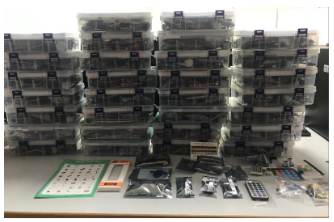
The targeted students are those in the second year of the engineering program. Arduino Starter Kit with Tutorial Compatible with Arduino IDE , 30 Kits
THL Components
Overview of the concept and key components
Practical Work (PW) Statement:
Temperature and Humidity Measurement through DHT11
Introduction:
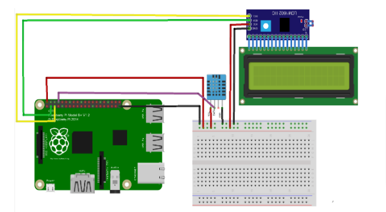
In this PW, you will be tasked with designing and simulating a temperature monitoring system using a DHT11 sensor connected to a Raspberry Pi or Arduino Uno through Universal Asynchronous Receiver-Transmitter (UART) communication.
The temperature measurement results will then be displayed on an LCD screen connected to the Raspberry Pi via I2C communication. The ultimate goal is to create a complete Simulink model that represents this system and can be deployed on the Raspberry Pi for real-world usage.
Visual representation of use cases
Here is a general connection diagram for the system described in the practical work statement:
30 Kits full components
Training Material
View training materials
Use cases for the labs (examples, experimentation, projects,....)
- Proposed practical works aim to introduce the use of the Arduino board and develop applications based on this board:
- Installation and configuration of the Arduino UNO R3 board :
- Description of the Arduino board : Arduino UNO R3 board
- Discovering the Arduino development platform
- Test: control an LED with the Arduino
- Lab Session 1: Temperature measurement:
- Using an LM35 sensor
- Using DHT11 sensor
- Lab Session 2: Measure temperature and humidity with the DHT11 sensor
- Lab session 3: Using an IR Receiver and a Remote Control with Arduino
- Arduino Uno
- Infrared (IR) receiver
- Infrared remote control (compatible with the IR receiver)
- Connection cables
- Communication between Raspberry Pi 4 and Sensors with Display on LCD Screen:
- This lab aims to familiarize students with the communication between a Raspberry Pi 4 and various sensors via UART and I2C protocols, as well as the display of data on an LCD screen.
- Objectives
- To know how to configure and use UART and I2C interfaces.
- Toreadand interpret sensor data.
- Todisplaydata on an LCD screen.
Curriculum
Link to the existing and planned curriculum and/or experiment categories:
GE35: Industrial Instrumentation course, 30 students per group (2 groups)
M53: SMART Cities, 30 students per group (2 groups)
Adapted courses which take advantage of RL/THL equipment (Current update)
Status of THL availability for the students
| Arduino Lab
|
Raspberry Lab
Kit Raspberry: Available
Sensors:
|
|

|
Students Trained
Status update of Training materials
- Ready for Arduino kits:
- We Shared with the students the Arduino kits (Equipment) and the sheets (Material Lab) of the demanded Practical Works.
- students' reports and videos of manipulations: done
- Raspberry sensors
Most significant value created by having students use your lab experiments
Some potential benefits and considerations for developing a modular platform:
Flexibility, Scalability, Interdisciplinary Learning, Resource optimization, Customization, Adaptation to technological advances
Students Feedback
Pre-Survey for Take Home Labs (THLs)
Post-Survey for Take Home Labs (THLs)
Instructors/staff Feedback
Didactical needs
- Take-Home Lab (THL) provide students free accessibly, autonomous, and hands-on learning experience.
- THL is accessible to all students,
- Combine THL with simulation tools (such as Proteus, MATLAB) to allow students to experiment virtually before working on physical components.
- Incorporate technical challenges that encourage students to apply their knowledge and develop problem-solving skills.…
Obstacles or limitations
- Hardware Issues: Students might encounter problems with broken or damaged components in the kits
- Software Compatibility: Ensuring the software required for simulations or programming runs smoothly on various student devices can be challenging.
- Kits can be lost or damaged during use or transport, causing additional costs and delays.
Lessons Learned
- Educational approach which is an innovative solution that enhances accessibility and autonomy for students.
- THLs that include projects with real-world relevance (e.g., IoT devices, automation, environmental monitoring) increase motivation and practical understanding.
- Linking THL projects to potential career applications helps students to see the value of their work.
Contact Information
Email: t.hassboun@uca.ma / h.elkabtane@uca.ma
Photos